The home row
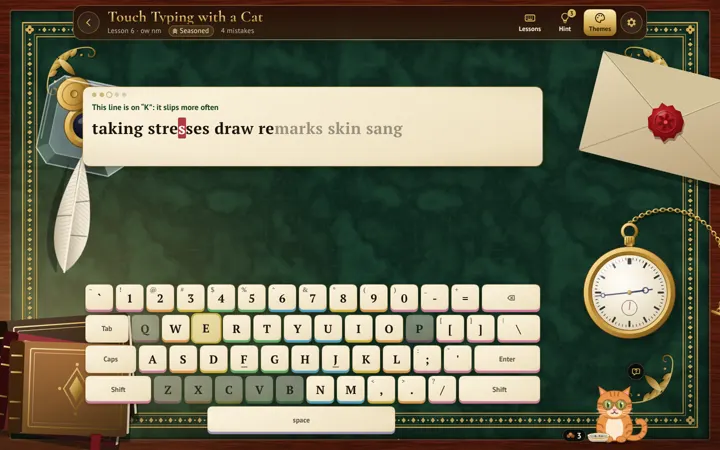
Rest your fingers on the home row: index fingers on F and J, the keys with little bumps (the same keys on the Russian layout). Look at the line, not at your hands, and type.
A touch typing trainer that never scolds you for typos: a wrong letter turns red, and you can erase it or keep typing — the lesson doesn’t start over. Lessons go finger by finger, lines are made of real words, and the on-screen keyboard shows which finger to use. Free.
The goal is to type without looking at the keyboard: accuracy first, and speed will follow.
Rest your fingers on the home row: index fingers on F and J, the keys with little bumps (the same keys on the Russian layout). Look at the line, not at your hands, and type.
A lesson is five lines (four in the Text lesson). Each lesson adds two to four new keys, and lines use only letters you have already learned. After the alphabet come capitals, punctuation, digits and real text.
A wrong character stays in place in red: erase it with Backspace or keep typing. A line ends when it is typed in full and the last character is right; Enter at the end accepts it as it is.
Stars are for the lesson’s accuracy: 97% or more earns three, 92% or more two, less than that one. Two stars open the next lesson. Your speed in words per minute appears after each line, never while you type.
Yes. Start right away, with nothing to install. Progress saves itself.
The on-screen keyboard works on phones and tablets, but touch typing is learned on a real keyboard, so a computer is the better choice.
You can type it as Ye — that doesn’t count as a mistake. Yo in its own place is taught in a separate lesson.
A warning appears above the line, and letters are typed as if it were off — they won’t count as mistakes.