Clues and arrows
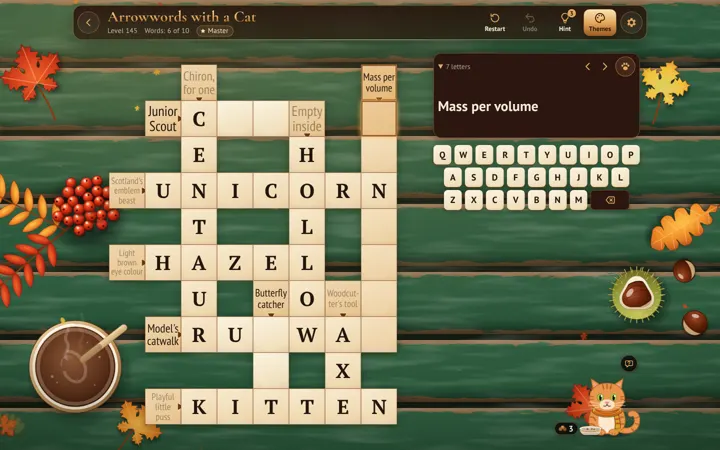
A cell with text is a clue. The arrow at its edge shows where the answer goes: right or down. A cell can hold two clues: the top one answers to the right, the bottom one downward.
A classic arrowword like the ones in newspapers: the clues sit right inside the grid cells, and an arrow shows which way the answer goes. There are 500 puzzles in English and 500 in Russian, so the game also helps if you are learning a language. Free — on a computer, phone or tablet.
The goal is to guess every word and fill the grid. An answer runs the way the arrow points, with its clue in the cell just before it.
A cell with text is a clue. The arrow at its edge shows where the answer goes: right or down. A cell can hold two clues: the top one answers to the right, the bottom one downward.
Tap a clue or any cell of the word: its cells light up, the cursor jumps to the first empty one, and the clue appears in large type above the input. Tapping a crossing cell again switches direction.
Letters go in order and the cursor moves along the word by itself. English puzzles have a QWERTY keyboard, Russian ones their own.
Fill a word correctly and a golden shimmer runs across its letters, they lock in, and the cursor moves to the next word. Get it wrong and the cells shake; erase the letters or type over them.
Yes. Play right away, with nothing to install.
In English and in Russian: 500 levels in each language, with separate progress. The puzzles follow the game language, and you can switch the word language in the settings. The English bank has over two thousand words, the Russian one over five thousand, and each has a plain clue and a terse newspaper-style one.
Look at the arrow at the edge of the clue cell: it points right or down. If a cell holds two clues, the upper one is for the word going right and the lower one for the word going down. Or just tap the clue and its cells light up.
Yes. You can erase wrong letters or type over them, and Undo takes back typed letters. Only a solved word and a letter revealed by a hint stay for good.