Grid and topic
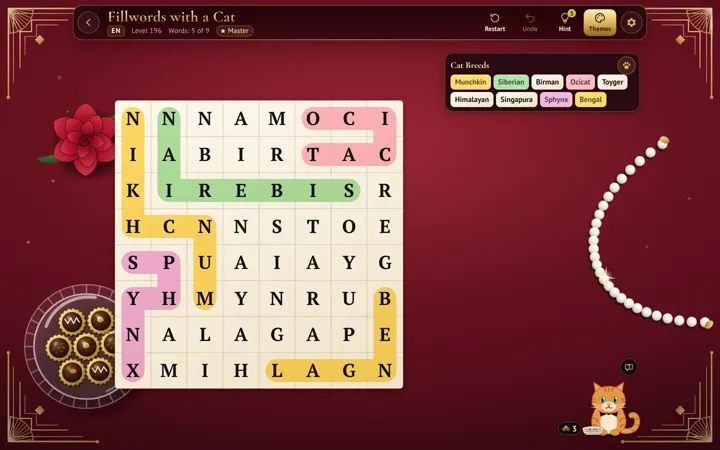
The grid goes from 4×4 for beginners to 8×9 for masters. It is made up entirely of words on one topic, which is written above the word list.
A grid hides words on a single topic, snaking around the board, and every letter belongs to exactly one word. Trace words with your finger, one after another. Free — on a computer, phone or tablet.
The goal is to find every word of the topic in the grid. Each letter belongs to exactly one word, so no letters are left over.
The grid goes from 4×4 for beginners to 8×9 for masters. It is made up entirely of words on one topic, which is written above the word list.
A word runs through neighbouring cells — up, down, left, right — and can turn corners. No diagonals.
Drag your finger across a word’s letters, starting from the first or the last. As soon as the path forms a word it is found — no need to lift your finger — and the word is highlighted in its own colour. You can also tap letters one by one.
On the Beginner and Amateur stages the words in the list are fully visible. Veteran shows the first letter and blanks, Master shows only blanks, one per letter. In the settings you can turn on the full list at any stage.
Yes. Play right away, with nothing to install.
No. A word moves only to neighbouring cells up, down, left or right, though it can turn. That is what sets a fillword apart from an ordinary word search.
Yes. Choose the language you are learning and a level from A1 to B2: all the words in a grid share one topic, and the cat gives a translation and explanation for every word you find. Found words add up in the “words learned” count in your stats.
Ask the cat: the paw next to the topic hints at the meaning of a word you haven’t found. Or press the hint button to see its next letter. Press Escape to clear a path you started.