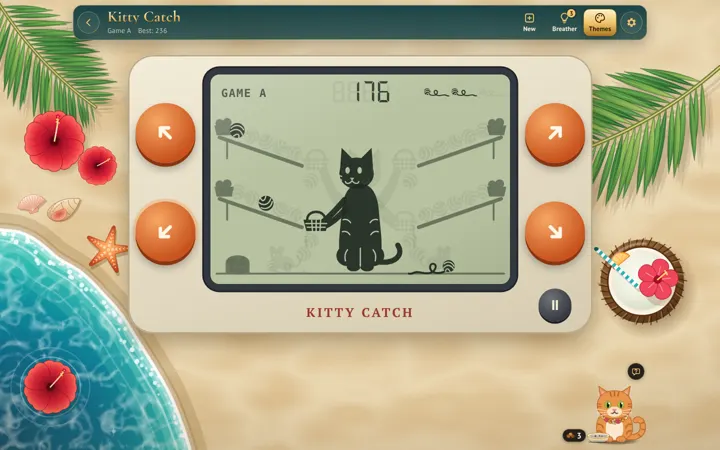
Shelves and the cat
There are four shelves — two on the left and two on the right, top and bottom. A ball rolls down a shelf for five steps and drops off the edge on the sixth. Press a corner button and the cat runs to that shelf with its basket.
Remember the pocket games with an LCD screen? Here balls of yarn roll down four shelves, and a cat with a basket runs over to catch them. Too slow, and the ball drops and unravels. But if the little mouse is peeking out of its hole, it catches the ball itself. Free, on a computer or a phone.
The goal is to catch 200 balls of yarn (100 in Calm), then keep catching for a record. Three misses and the game is over.
There are four shelves — two on the left and two on the right, top and bottom. A ball rolls down a shelf for five steps and drops off the edge on the sixth. Press a corner button and the cat runs to that shelf with its basket.
A ball that misses the basket is a miss, and it unravels on the floor. If the little mouse is peeking out of its hole at that moment, it catches the ball itself — only half a miss. Three full misses end the game, and at 200 and 500 balls caught all misses are cleared.
The more you catch, the faster the yarn rolls and the more balls are on the shelves. After every hundred the pace eases off for a little while. Two balls never drop at the same moment, so every one can be caught.
Three misses and the game is over. Start a new one, or once per game take One more try: the misses are cleared, the shelves are emptied and your score stays.
Yes. Play right away, with nothing to install. Your game saves itself.
Q and A are the left shelves (top and bottom), P and L the right ones. Or use the arrows: left and right choose the side, up and down the height. Space pauses.
In Calm the yarn only speeds up to a comfortable pace, there are no penalties and the game never ends — misses are simply counted. The goal is 100 balls.
One game for every player that day, by Moscow date: the yarn rolls the same way for everyone, however they catch. Compare your score with friends.